How to Build an Optionomics MCP Chatbot in Python with Chainlit
Wire a browser chatbot to live options flow, gamma exposure, and volatility data through one remote MCP server
Introduction
The Optionomics MCP server connects AI assistants directly to Optionomics market intelligence through the Model Context Protocol. Instead of pasting quotes, options flow, gamma exposure, or volatility metrics into a prompt by hand, your chatbot retrieves that data through MCP while it answers.
This tutorial builds a complete Python chatbot on top of Optionomics MCP. The chatbot will:
- Run in the browser with a polished chat interface
- Keep Optionomics credentials server-side
- Use the OpenAI Responses API for model orchestration
- Attach the Optionomics MCP server as a remote MCP tool source
- Preserve conversation state across chat turns
- Let the model choose the right Optionomics tools for each market question
- Return clear, caveated, research-oriented answers
The stack:
- Python 3.11+ for the runtime
- Chainlit for the chatbot UI and chat lifecycle
- OpenAI Python SDK for the Responses API
- OpenAI Responses API remote MCP tools for standards-based tool use
- Optionomics MCP for authenticated market intelligence
- Pydantic Settings for environment-based configuration
By the end, you will be able to run:
chainlit run app.py -w
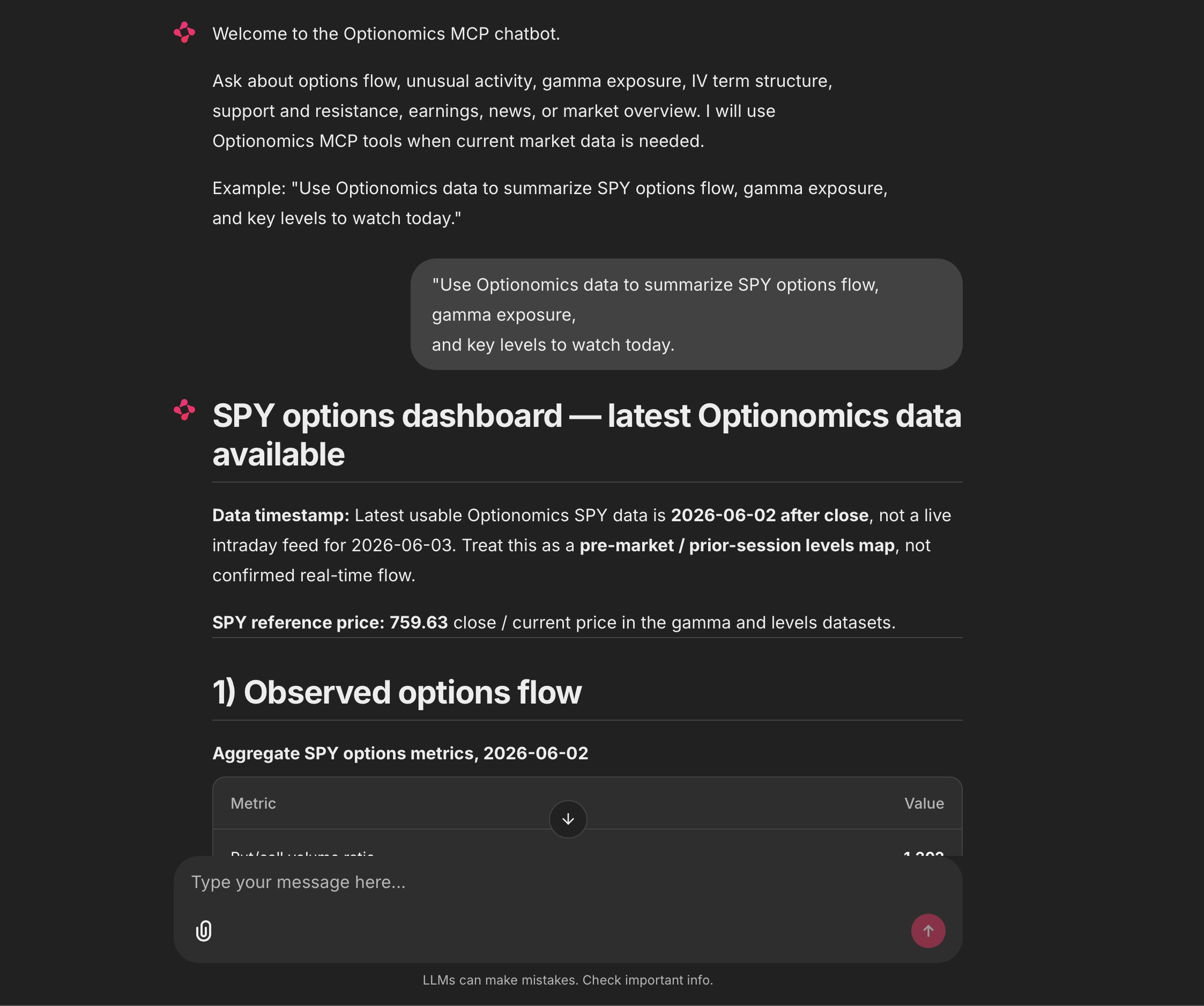
Then open a browser chat and ask questions like:
Use Optionomics data to summarize the current options flow sentiment for SPY. Include bullish evidence, bearish evidence, and key levels to watch.
The model calls the Optionomics MCP server while answering, so your Python app never has to implement a separate function for every market data workflow.
To be clear: this is not a trading bot. It does not place trades, connect to a brokerage account, or make decisions for the user. It is a market research chatbot that uses Optionomics data to explain what is happening.
What Is MCP?
MCP stands for Model Context Protocol, a standard way for AI applications to connect to external tools and data sources.
Without MCP, you write custom integration code for every capability:
- One function for quotes
- One function for options chains
- One function for options flow
- One function for unusual activity
- One function for gamma exposure
- One function for news
- One function for earnings
- One function for IV term structure
That works, but it accumulates glue code fast. MCP replaces it with a standard tool interface: the model discovers the available tools, decides when one is relevant, calls it, and uses the result in its answer.
Optionomics exposes market data and analytics through a remote MCP server:
https://optionomics.ai/mcp
We attach that server to each model request as a remote MCP tool. The chatbot sends the user’s question to the model, the model decides which Optionomics tools to call, and the final response flows back to Chainlit.
Why Use Chainlit for the Chatbot?
Chainlit is a Python framework for building conversational AI applications. It fits this project well because it delivers a real browser chatbot without a separate frontend project.
With Chainlit, you get:
- A ready-to-use chat UI
- Chat lifecycle hooks such as
on_chat_startandon_message - Per-chat user session state
- Starter prompts for common workflows
- Local development with hot reload
- A path to authentication, persistence, and production deployment later
FastAPI is excellent for building an HTTP API, but our goal here is a chatbot. Chainlit lets us focus on the AI and MCP integration instead of frontend scaffolding.
What the Optionomics MCP Server Provides
The Optionomics MCP server exposes market intelligence tools for traders, analysts, developers, and AI-assisted research workflows.
Available tools include:
| Tool | What it helps answer |
|---|---|
| Stock Quote | What is the current or historical OHLC, volume, and price change for a symbol? |
| Options Chain | What strikes, expirations, prices, open interest, and Greeks are available? |
| Option Metrics | What are the put/call ratio, IV rank, IV percentile, GEX, DEX, max pain, and call/put walls? |
| Options Flow | Is recent options flow more bullish or bearish? What are the top calls and puts? |
| Net Flow | How has net call or put premium changed over time? |
| Unusual Activity | What high-premium or high-volume options activity stands out? |
| Dark Pool Levels | Where are large dark pool derived support and resistance levels? |
| Support and Resistance | What key levels are implied by options flow activity? |
| Market Overview | How are major index ETFs such as SPY, QQQ, DIA, and IWM moving? |
| Gamma Exposure | Where are important GEX strike levels and gamma regime context? |
| Trend Analysis | What does price trend, momentum, volatility, and level context look like? |
| IV Term Structure | How do IV30, IV60, IV90, IV rank, and realized-vs-implied volatility compare? |
| Price History | What has daily OHLCV, return, drawdown, average volume, and realized volatility looked like? |
| Earnings Calendar | What earnings events are coming up? |
| News | What recent ticker or market headlines are relevant? |
| Events | What macro, Fed, Treasury, commodity, filing, earnings, or company events may matter? |
Available resources include:
| Resource | What it provides |
|---|---|
| Available Symbols | The list of tracked symbols |
| Trading Days | The list of available trading dates |
The model reaches for these tools whenever a question needs current or historical market data.
Requirements
Before writing any code, make sure you have the following.
1. Optionomics Vega Subscription
MCP access requires an Optionomics Vega subscription.
2. Optionomics API Credentials
You need:
- The email address on your Optionomics account
- An Optionomics API token from Account > API Keys
See the API Key Management guide if you need help creating a token.
3. OpenAI API Key
This tutorial uses the OpenAI Responses API because it supports remote MCP servers natively. You need an OpenAI API key in OPENAI_API_KEY.
4. Python 3.11+
Check your Python version:
python --version
If your system uses python3, run:
python3 --version
Authentication Patterns
Optionomics supports two authentication styles for MCP clients.
Header Authentication
Many MCP clients can send custom headers directly:
X-USER-EMAIL: [email protected]
X-USER-TOKEN: your-api-token
Editor integrations such as Cursor, VS Code, Windsurf, and Gemini CLI commonly use this style.
Bearer Authentication
Some programmatic clients prefer a single Authorization header. Optionomics accepts this format too:
Authorization: Bearer base64(email:token)
For example, if your email is [email protected] and your token is abc123, encode this string:
[email protected]:abc123
The encoded value is sent as a bearer token.
Important: Base64 is encoding, not encryption. Treat the encoded value exactly like the original API token. Do not commit it, log it, paste it into support tickets, or expose it in browser code.
The chatbot below builds this bearer token at runtime from environment variables.
Architecture
The chatbot flow looks like this:
The Python app stays small because the market data integration lives behind MCP. The chatbot never needs to enumerate Optionomics tools ahead of time: it hands the model access to the server, and the model chooses the right tool calls for each question.
Create the Project
Create a new directory:
mkdir optionomics-mcp-chatbot
cd optionomics-mcp-chatbot
Create and activate a virtual environment:
python -m venv .venv
source .venv/bin/activate
On Windows PowerShell:
python -m venv .venv
.venv\Scripts\Activate.ps1
Create this project structure:
optionomics-mcp-chatbot/
  .env
  .env.example
  .gitignore
  requirements.txt
  app.py
Install Dependencies
Create requirements.txt:
chainlit
openai
pydantic-settings
Install dependencies:
pip install -r requirements.txt
If you use uv, install the same dependencies with:
uv pip install -r requirements.txt
For a production application, pin versions after testing. For example:
chainlit==2.0.0
openai==2.0.0
pydantic-settings==2.7.0
The latest versions change over time, so check your dependency resolver and test before deploying.
Configure Environment Variables
Create .env.example:
OPENAI_API_KEY=sk-your-openai-key
OPENAI_MODEL=gpt-4o

OPTIONOMICS_EMAIL=[email protected]
OPTIONOMICS_TOKEN=your-optionomics-api-token
OPTIONOMICS_MCP_URL=https://optionomics.ai/mcp
Copy it to .env:
cp .env.example .env
Edit .env and replace the placeholder values.
Create .gitignore:
.env
.venv/
__pycache__/
.chainlit/
Never commit .env. The chatbot runs server-side, so your OpenAI key and Optionomics token must never reach the browser.
Complete Chatbot Code
Create app.py with the complete code below.
from __future__ import annotations

import base64
from functools import lru_cache
from typing import Any

import chainlit as cl
from openai import AsyncOpenAI, OpenAIError
from pydantic import Field
from pydantic_settings import BaseSettings, SettingsConfigDict


SYSTEM_INSTRUCTIONS = """
You are an options market research chatbot powered by Optionomics data.

Use Optionomics MCP tools whenever the user asks for current or historical
market data, including quotes, options chains, options flow, unusual activity,
net flow, gamma exposure, dark pool levels, support and resistance, IV term
structure, price history, earnings, news, or market-moving events.

When answering:
- Be clear about the symbol, timeframe, and data type being discussed.
- Separate observed data from interpretation.
- Summarize bullish evidence, bearish evidence, and neutral or mixed evidence when useful.
- Mention important caveats such as stale data, missing data, liquidity, event risk, and market regime.
- Do not claim certainty about future price movement.
- Do not provide personalized financial advice.
- Do not tell the user to buy, sell, short, hold, or enter a specific trade.
- Keep answers readable for an options-aware but busy trader.
""".strip()


WELCOME_MESSAGE = """
Welcome to the Optionomics MCP chatbot.

Ask about options flow, unusual activity, gamma exposure, IV term structure,
support and resistance, earnings, news, or market overview. I will use
Optionomics MCP tools when current market data is needed.

Example: "Use Optionomics data to summarize SPY options flow, gamma exposure,
and key levels to watch today."
""".strip()


class Settings(BaseSettings):
    """Application settings loaded from environment variables."""

    openai_api_key: str = Field(alias="OPENAI_API_KEY")
    openai_model: str = Field(default="gpt-4o", alias="OPENAI_MODEL")

    optionomics_email: str = Field(alias="OPTIONOMICS_EMAIL")
    optionomics_token: str = Field(alias="OPTIONOMICS_TOKEN")
    optionomics_mcp_url: str = Field(
        default="https://optionomics.ai/mcp",
        alias="OPTIONOMICS_MCP_URL",
    )

    model_config = SettingsConfigDict(env_file=".env", env_file_encoding="utf-8")


@lru_cache
def get_settings() -> Settings:
    """Load settings once and reuse them across chat turns."""

    return Settings()


@lru_cache
def get_openai_client() -> AsyncOpenAI:
    """Create one AsyncOpenAI client for the Chainlit process."""

    settings = get_settings()
    return AsyncOpenAI(api_key=settings.openai_api_key)


def build_optionomics_bearer_token(settings: Settings) -> str:
    """Build the bearer token for Optionomics MCP authentication."""

    raw_credentials = f"{settings.optionomics_email}:{settings.optionomics_token}"
    encoded_credentials = base64.b64encode(raw_credentials.encode("utf-8")).decode("ascii")

    return f"Bearer {encoded_credentials}"


def optionomics_mcp_tool(settings: Settings) -> dict[str, Any]:
    """Return the remote MCP tool configuration for the Responses API."""

    return {
        "type": "mcp",
        "server_label": "optionomics",
        "server_description": "Optionomics market intelligence, options flow, Greeks, volatility, levels, news, events, and earnings data.",
        "server_url": settings.optionomics_mcp_url,
        "headers": {
            "Authorization": build_optionomics_bearer_token(settings),
        },
        "require_approval": "never",
    }


def build_user_input(message: cl.Message) -> list[dict[str, str]]:
    """Build a Responses API input message from the Chainlit user message."""

    content = f"""
User question:
{message.content.strip()}

Use Optionomics MCP tools if current or historical market data would improve the answer.
If the available data is mixed, incomplete, or inconclusive, say that clearly.
""".strip()

    return [{"role": "user", "content": content}]


def extract_mcp_tool_names(response: Any) -> list[str]:
    """Return MCP tool names used in a response without exposing raw tool output."""

    names: list[str] = []

    for item in getattr(response, "output", []) or []:
        if getattr(item, "type", None) != "mcp_call":
            continue

        name = getattr(item, "name", None)
        if name and name not in names:
            names.append(name)

    return names


@cl.set_starters
async def set_starters() -> list[cl.Starter]:
    """Show useful starter prompts in the Chainlit UI."""

    return [
        cl.Starter(
            label="SPY flow and levels",
            message="Use Optionomics data to summarize SPY options flow, gamma exposure, and key levels to watch today.",
        ),
        cl.Starter(
            label="TSLA unusual activity",
            message="Find notable unusual options activity for TSLA and explain what makes it unusual. Do not make a trade recommendation.",
        ),
        cl.Starter(
            label="NVDA volatility context",
            message="Analyze NVDA IV term structure and options flow. Explain whether the data looks directional, volatility-driven, or mixed.",
        ),
        cl.Starter(
            label="Market overview",
            message="Give me an Optionomics market overview for SPY, QQQ, DIA, and IWM. Focus on price change, volume, and options context.",
        ),
    ]


@cl.on_chat_start
async def on_chat_start() -> None:
    """Initialize per-chat state and greet the user."""

    cl.user_session.set("previous_response_id", None)
    await cl.Message(content=WELCOME_MESSAGE).send()


@cl.on_message
async def on_message(message: cl.Message) -> None:
    """Handle one user chat turn with Optionomics MCP enabled."""

    settings = get_settings()
    client = get_openai_client()
    previous_response_id = cl.user_session.get("previous_response_id")

    response_message = cl.Message(content="Researching with Optionomics MCP...")
    await response_message.send()

    request: dict[str, Any] = {
        "model": settings.openai_model,
        "instructions": SYSTEM_INSTRUCTIONS,
        "tools": [optionomics_mcp_tool(settings)],
        "input": build_user_input(message),
    }

    if previous_response_id:
        request["previous_response_id"] = previous_response_id

    try:
        response = await client.responses.create(**request)
    except OpenAIError as exc:
        response_message.content = (
            "I could not complete the market research request right now. "
            "Check your OpenAI key, Optionomics credentials, model access, and MCP access."
        )
        await response_message.update()
        raise RuntimeError("OpenAI or MCP request failed") from exc

    answer = (response.output_text or "").strip()

    if not answer:
        response_message.content = "The model returned an empty response. Try a more specific market question."
        await response_message.update()
        return

    cl.user_session.set("previous_response_id", response.id)

    tool_names = extract_mcp_tool_names(response)
    tool_note = ""

    if tool_names:
        tool_note = "\n\n_Data checked with Optionomics MCP tools: " + ", ".join(tool_names) + "._"

    response_message.content = answer + tool_note
    await response_message.update()
That is the entire chatbot. In one file, you now have:
- A browser chat UI
- Starter prompts
- Per-chat state with
cl.user_session - OpenAI Responses API integration
- Remote MCP server configuration
- Optionomics bearer token generation
- Conversation continuity with
previous_response_id - Tool usage notes that show which Optionomics MCP tools were called
- Server-side credential handling
Run the Chatbot
Start Chainlit:
chainlit run app.py -w
Chainlit will print a local URL, usually:
http://localhost:8000
Open the URL in your browser. You should see the welcome message and starter prompts.
Try this first prompt:
Use Optionomics data to summarize the current options flow sentiment for SPY. Include bullish evidence, bearish evidence, and key levels to watch.
The chatbot should respond with a market research summary. If the model used Optionomics MCP tools, the answer ends with a short note like:
Data checked with Optionomics MCP tools: options_flow, gamma_exposure.
The exact tool names and answer content depend on the question and the available market data.
How Conversation State Works
A chatbot should remember the prior turn. If the user asks:
Analyze SPY options flow today.
They may follow up with:
Now compare that with QQQ.
The second question depends on the first. The code handles this with previous_response_id:
previous_response_id = cl.user_session.get("previous_response_id")

if previous_response_id:
    request["previous_response_id"] = previous_response_id

response = await client.responses.create(**request)
cl.user_session.set("previous_response_id", response.id)
The Responses API uses the previous response as conversation context, so you never copy the full chat transcript into each request. This matches current Responses API conversation-state patterns.
Note that the Optionomics MCP tool configuration is still sent on every request. That keeps tool availability explicit and ensures any future turn can call Optionomics again.
How MCP Is Attached to the Model
This function is the bridge between OpenAI and Optionomics:
def optionomics_mcp_tool(settings: Settings) -> dict[str, Any]:
    return {
        "type": "mcp",
        "server_label": "optionomics",
        "server_description": "Optionomics market intelligence, options flow, Greeks, volatility, levels, news, events, and earnings data.",
        "server_url": settings.optionomics_mcp_url,
        "headers": {
            "Authorization": build_optionomics_bearer_token(settings),
        },
        "require_approval": "never",
    }
The fields mean:
| Field | Meaning |
|---|---|
type |
Tells the Responses API this is an MCP tool server |
server_label |
A short name for the server inside the model context |
server_description |
Helps the model understand when this server is useful |
server_url |
The remote Optionomics MCP endpoint |
headers |
Authentication headers sent to Optionomics |
require_approval |
Whether MCP tool calls need explicit approval before running |
For this server-side chatbot, require_approval: "never" lets the model call Optionomics tools without pausing for a separate approval step, which keeps the chat experience smooth.
If you are building a regulated workflow, or sending sensitive user data to a third-party MCP server, add an approval flow. Here the server is Optionomics itself and the chatbot exists specifically to use Optionomics market data, so automatic approval is appropriate.
Why the Code Uses Bearer Auth
The code builds this header:
Authorization: Bearer base64(email:token)
The implementation:
def build_optionomics_bearer_token(settings: Settings) -> str:
    raw_credentials = f"{settings.optionomics_email}:{settings.optionomics_token}"
    encoded_credentials = base64.b64encode(raw_credentials.encode("utf-8")).decode("ascii")

    return f"Bearer {encoded_credentials}"
Bearer auth keeps the MCP tool configuration compact. If your client supports custom headers directly, Optionomics also accepts:
X-USER-EMAIL: [email protected]
X-USER-TOKEN: your-api-token
For this chatbot, bearer auth works well: the Python backend builds the header and sends it to the remote MCP server, and the browser never sees the token.
Try More Chat Prompts
Use these prompts to test different Optionomics tools.
Market Overview
Give me an Optionomics market overview for SPY, QQQ, DIA, and IWM. Focus on price change, volume, and options context.
Unusual Options Activity
Find notable unusual options activity for TSLA and explain what makes it unusual. Separate bullish and bearish evidence.
Gamma Exposure and Levels
Analyze AAPL gamma exposure and support/resistance. What strikes or levels look important? Keep it educational and avoid trade recommendations.
IV Term Structure
Use Optionomics data to explain NVDA implied volatility term structure. Compare short-term and longer-term IV and explain what could make the interpretation wrong.
Earnings and Event Context
Are there upcoming earnings, news, or market-moving events that could matter for MSFT options? Summarize the key risks.
Follow-Up Question
After asking about one symbol, try a follow-up:
Now compare that setup with QQQ and tell me what is different.
Because the chatbot stores previous_response_id, the model has context from the prior turn.
Verifying Optionomics MCP Credentials Directly
If the chatbot cannot connect, verify your Optionomics credentials outside Python first.
Run this curl request:
curl -s -w "\n%{http_code}" \
  -X POST \
  -H "Content-Type: application/json" \
  -H "X-USER-EMAIL: [email protected]" \
  -H "X-USER-TOKEN: your-api-token" \
  -d '{"jsonrpc":"2.0","id":1,"method":"initialize","params":{"protocolVersion":"2024-11-05","capabilities":{},"clientInfo":{"name":"chainlit-test","version":"1.0"}}}' \
  https://optionomics.ai/mcp
Expected outcomes:
| Status | Meaning |
|---|---|
200 |
Credentials and MCP access are working |
401 |
Email or token is incorrect |
403 |
Credentials are valid, but the account does not have MCP access |
If curl fails, fix the credentials or subscription access before debugging Chainlit or OpenAI.
Common Errors and Fixes
401 Unauthorized
This usually means the email or token is wrong.
Check:
- The email exactly matches your Optionomics account email
- The token was copied correctly
- There are no leading or trailing spaces in
.env - You did not accidentally include shell quotes as part of the value
403 Forbidden
This usually means the credentials are valid but the account does not have the required plan access. MCP access requires a Vega subscription.
OpenAI Authentication Error
If OpenAI authentication fails, check:
OPENAI_API_KEYis set- The key is active
- The project has access to the selected model
OPENAI_MODELpoints to a model that supports the Responses API and MCP tools
Chainlit Starts, but the Chatbot Fails on First Message
This usually means an environment variable is missing or invalid.
Check:
.envexists in the same directory asapp.pyOPENAI_API_KEYis setOPTIONOMICS_EMAILis setOPTIONOMICS_TOKENis setOPTIONOMICS_MCP_URLishttps://optionomics.ai/mcp
Tool Calls Are Not Happening
The model decides when tool use is needed. If it answers without calling Optionomics MCP, make the prompt explicit:
Use Optionomics MCP tools to retrieve the latest SPY options flow and gamma exposure before answering.
If every answer in your app must use fresh Optionomics data, tighten the system instructions instead.
The Answer Is Too Long
Add formatting guidance to the user prompt:
Keep the answer under 250 words and use sections: Flow, Levels, Volatility, Caveats.
Or adjust SYSTEM_INSTRUCTIONS to enforce your preferred answer style.
Follow-Up Questions Lose Context
Make sure this line runs after every successful response:
cl.user_session.set("previous_response_id", response.id)
Also confirm you are not refreshing the browser or starting a new Chainlit chat session between turns — each new session starts with empty state.
Security Best Practices
Any chatbot connected to market data tools must handle credentials carefully.
Keep Tokens Server-Side
Never expose your Optionomics token in browser JavaScript, mobile apps, public repositories, screenshots, logs, or analytics events.
This tutorial keeps the token inside the Chainlit server process.
Use Environment Variables
.env is fine for local development. In production, use your deployment platform’s secret manager:
- Docker secrets
- Kubernetes secrets
- Fly.io secrets
- Render environment variables
- Railway environment variables
- AWS Secrets Manager
- Google Secret Manager
- Azure Key Vault
Do Not Log Headers
Never log the MCP Authorization header. If you add request logging, redact credentials.
Add User Authentication Before Deploying
The tutorial app has no user login. That is acceptable for local development, but never for a public deployment. Before exposing it, add authentication so only approved users can reach the chatbot.
Common options:
- Chainlit authentication
- OAuth through your identity provider
- SSO for an internal research tool
- A private VPN or internal network boundary
Add Abuse Controls
For production, consider:
- Per-user rate limits
- Message length limits
- Request timeout limits
- Token and cost monitoring
- Prompt logging with sensitive data redaction
- Monitoring for repeated failed auth
Improving the Chatbot for Production
The sample app is complete for local development. Production systems usually need a few more pieces.
1. Streaming Responses
The example uses a non-streaming Responses API call to keep the code easy to follow. For production chat, streaming improves perceived speed because users see text appear as the model writes.
The Responses API supports streaming events, and Chainlit supports token streaming with stream_token. If you add streaming, handle non-text events carefully — MCP tool calls also appear in the response event stream.
2. Persistent Chat History
Storing previous_response_id in the Chainlit user session is enough for a live chat. If users should be able to resume old chats, add persistence.
You can store:
- Chainlit session ID
- User ID
- Latest
previous_response_id - User messages
- Assistant answers
- Tool names used
- Timestamps
Do not store raw credentials or authorization headers.
3. Tool Use Transparency
The example adds a small note showing MCP tool names used:
Data checked with Optionomics MCP tools: options_flow, gamma_exposure.
That gives users confidence the chatbot retrieved data rather than guessing. For production, polish this with Chainlit steps or metadata panels.
Do not expose raw tool traces to end users unless you have reviewed them for privacy and readability.
4. Prompt Profiles
You may want different modes:
- Quick summary
- Deep research
- Volatility-focused
- Flow-focused
- Earnings-focused
- Education mode
Chainlit supports chat profiles and settings, so you can map each profile to different system instructions.
5. Caching
Market overview questions repeat often, and short-lived caching can cut latency and cost.
Choose cache durations carefully:
- Very short cache for active market questions
- Longer cache for historical explanations
- No cache for sensitive user-specific prompts
6. Evaluation
Create a small set of test prompts and review answers regularly.
Useful evaluation prompts:
- “Summarize SPY flow without making a recommendation.”
- “Explain mixed bullish and bearish evidence for TSLA.”
- “Compare NVDA IV term structure before earnings.”
- “Give key caveats for a gamma exposure interpretation.”
Check whether the chatbot:
- Uses tools when it should
- Avoids trade recommendations
- Separates data from interpretation
- Mentions uncertainty
- Keeps answers concise enough for users
Prompting Tips for Better Results
MCP gives the model tools, but the prompt still matters: clear prompts lead to better tool selection and better answers.
Be Specific About Symbols
Less effective:
What is going on today?
More effective:
Use Optionomics data to summarize today's options flow, gamma exposure, and key levels for SPY.
Ask for Evidence
Less effective:
Is TSLA bullish?
More effective:
Use Optionomics options flow and unusual activity data to summarize bullish and bearish evidence for TSLA. Do not make a trade recommendation.
Define the Output Format
Less effective:
Analyze NVDA.
More effective:
Analyze NVDA using Optionomics data. Return four sections: price context, options flow, volatility context, and key risks.
Ask for Caveats
Good research answers should explain uncertainty:
If the data is mixed or inconclusive, say that clearly and explain what would change the interpretation.
Full Local Test Checklist
Work through this checklist when something is not working.
- Confirm Python is installed:
python --version
- Confirm dependencies are installed:
pip freeze
- Confirm
.envexists:
ls -la .env
- Confirm Optionomics MCP credentials with curl:
curl -s -w "\n%{http_code}" \
  -X POST \
  -H "Content-Type: application/json" \
  -H "X-USER-EMAIL: [email protected]" \
  -H "X-USER-TOKEN: your-api-token" \
  -d '{"jsonrpc":"2.0","id":1,"method":"initialize","params":{"protocolVersion":"2024-11-05","capabilities":{},"clientInfo":{"name":"chainlit-test","version":"1.0"}}}' \
  https://optionomics.ai/mcp
- Start Chainlit:
chainlit run app.py -w
- Open the browser:
http://localhost:8000
- Ask a direct MCP-backed question:
Use Optionomics data to summarize the current market overview for SPY and QQQ.
- Ask a follow-up to test conversation state:
Now compare that with IWM.
Frequently Asked Questions
Can I call the Optionomics MCP server without OpenAI?
Yes. MCP is a protocol, not an OpenAI feature. Any MCP-compatible client that supports remote Streamable HTTP transport and custom headers can connect. This tutorial uses the OpenAI Responses API because it gives Python developers a compact way to combine model reasoning, conversation state, and remote MCP tool use.
Can I use X-USER-EMAIL and X-USER-TOKEN instead of bearer auth?
Yes, Optionomics supports those headers. This tutorial uses bearer auth because it fits the remote MCP tool configuration in Python.
Does the chatbot place trades?
No. The chatbot is for market research and explanation. It does not place orders, manage brokerage accounts, or make trading decisions.
Does the model always call an MCP tool?
No. The model decides when tool use is needed. If you want fresh Optionomics data behind every answer, say so explicitly in the system instructions or user prompt.
Can I deploy this chatbot?
Yes. Chainlit apps deploy like any other Python web app. Before going public, add authentication, rate limits, monitoring, and secure secret management.
Can I still build this with FastAPI?
Yes. FastAPI is the right choice when you want to expose an API endpoint to your own frontend. Chainlit wins for a tutorial chatbot because it provides a complete browser chat UI with less code.
Conclusion
The Optionomics MCP server makes Python a strong platform for market-aware AI applications. With Chainlit, the OpenAI Responses API, and remote MCP tools, a single small file becomes a browser chatbot that answers natural-language options questions while pulling live Optionomics data behind the scenes.
The key ideas:
- Use Chainlit when you want a complete Python chatbot UI.
- Use the Responses API for current remote MCP tool support.
- Attach
https://optionomics.ai/mcpas the remote MCP server. - Keep Optionomics credentials server-side.
- Use
previous_response_idfor conversation continuity. - Let the model call Optionomics tools when market data is needed.
- Require clear, caveated, research-oriented answers.
- Add authentication and abuse controls before production deployment.
For more setup options, see the full Optionomics MCP Server guide. For token creation and credential management, see API Key Management.
Disclaimer: Optionomics MCP tools provide market data and analytics for research and education. They do not guarantee outcomes and should not be treated as personalized financial advice. Always do your own research, understand the risks, and never trade with money you cannot afford to lose.
Master options trading with Optionomics
Get real-time options flow, AI-powered insights, and advanced analytics.
Get started