Market Commentary
Live AI play-by-play on flow, sentiment, and volatility
What Market Commentary is
Market Commentary is a running feed of short write-ups about the options market as conditions change. Instead of you stitching together ten screens to answer “what shifted in the last few minutes?”, each post tries to answer that in a headline plus a small number of sentences grounded in what the platform is already measuring: sentiment, net and directional flow, unusual activity, volatility tone, and related context.
Each item includes:
- A category (what kind of event it is—flow shift, whale print, sentiment swing, and so on).
- A severity (how loud the signal is in the feed—info vs notable vs critical).
- Often one or more symbols when the story is name-specific.
Availability: Theta and Vega plans
Commentary is market color and narrative context, not a trade recommendation. Bodies are written to cite concrete figures (premiums, flow direction, IV or skew language, etc.) so you can cross-check the post against options flow, unusual activity, or a stock’s analytics if you want to go deeper.
Where to find it
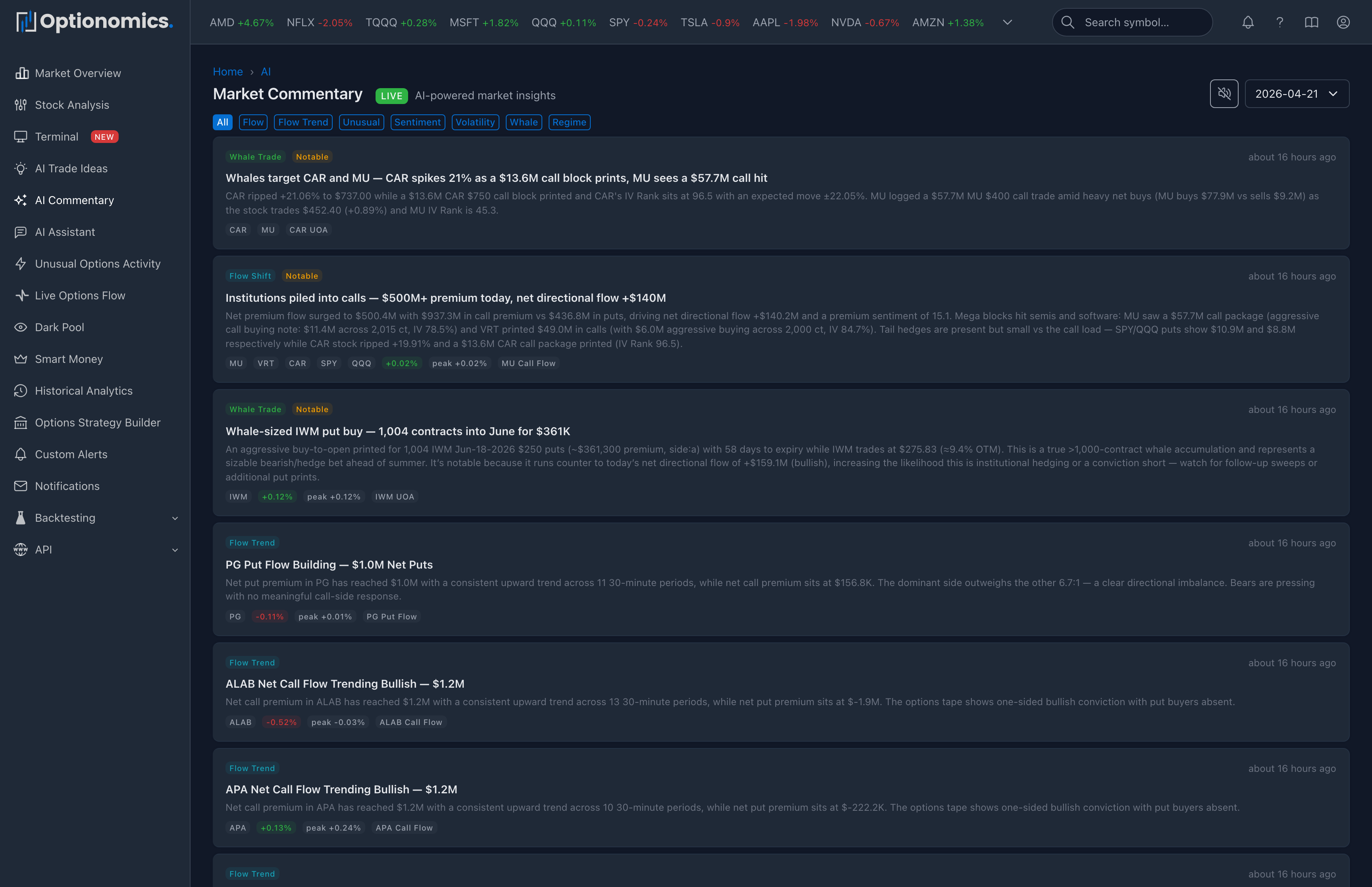
- Web: Choose Commentary in the sidebar (also at optionomics.ai/market). The feed is newest-first with a LIVE badge during the current session; new posts appear at the top while you stay on the page. Category pills across the top—All, Flow, Flow Trend, Unusual, Sentiment, Volatility, Whale, Regime—filter the feed in place.
- Voice narration: on the live session, a speaker toggle reads new commentary aloud through your browser, so the feed can run in a background tab like a squawk box. The choice is remembered per device.
- Mobile app: Open Commentary. Same content as web, with pull-to-refresh; live updates can arrive while the session is active.
When the feed is quiet: Commentary is event-driven. If nothing sufficiently new has happened compared with recent posts, you may see gaps—that is expected. Overnight or on holidays you may see little or no new content.
How to use it in your routine
A practical way to read the feed:
- Skim headlines and severity during busy periods to spot regime or flow changes without reading every line of the tape.
- Open tagged symbols when a post names tickers you care about or that match your watchlist.
- Pair with Trade Ideas when you want both market-wide color (Market Commentary) and single-name setups (Trade Ideas).
If a claim looks surprising, treat it as a prompt to verify in the raw tools—not as a final verdict.
Categories
Categories group posts so you can mentally sort what changed. Examples you will see:
| Category | Typical focus |
|---|---|
| Unusual activity | Large or rare prints, spikes |
| Flow shift / Flow trend | Directional premium and order-flow changes |
| Sentiment change | Bullish/bearish tone of the tape |
| Volatility alert | IV or skew regime moves |
| Whale trade | Very large single-name or basket flow |
| Sector rotation | Relative flow between sectors |
| Regime change | Broader market character shift |
| Market open / Market close | Session bookends |
| General | Other noteworthy context |
The exact list of categories may evolve over time as the product tightens language around real market behavior. If you use alerts, category filters help you subscribe only to the story types you care about (for example volatility-only, or whale-only).
Severity
Severity is a relative urgency dial inside the product, not a formal market data standard:
| Level | Role |
|---|---|
| Info | Background or incremental context—useful for orientation |
| Notable | Stronger shift or more striking print; worth a closer look more often |
| Critical | Highest emphasis in the feed for that post—reserved for the most striking changes |
When you build alerts on commentary, set a minimum severity (for example “notable and above”) if you want fewer pings and only the louder items.
Performance hints and jump links
Some rows include a compact view of how referenced symbols moved after the commentary snapshot—a change badge versus the captured reference price and sometimes a peak excursion. These are backward-looking hints to help you judge whether the callout aged well in price terms. They are not an audited track record, a model portfolio, or a promise of future results.
Each named symbol renders as a chip with its live day change, and flow- and whale-category posts carry jump links straight into the pre-filtered Flow or UOA tape, so verifying a claim against the underlying prints is one click.
Alerts on new commentary
You can mirror how you use option alerts: create an alert whose source is Market Commentary, optionally set Stock symbol so only posts that tag that ticker match (leave blank for any symbol), pick categories, and set minimum severity. Matching posts are delivered over the same channels as other alerts (email, SMS, chat apps, push, webhook, and the Notifications inbox when enabled).
→ Field reference: Market commentary alert criteria
Related
- Trade Ideas — symbol-level AI setups
- Alerts Management
- Notifications
