Dark Pool Trades
Off-exchange equity prints beside your options context
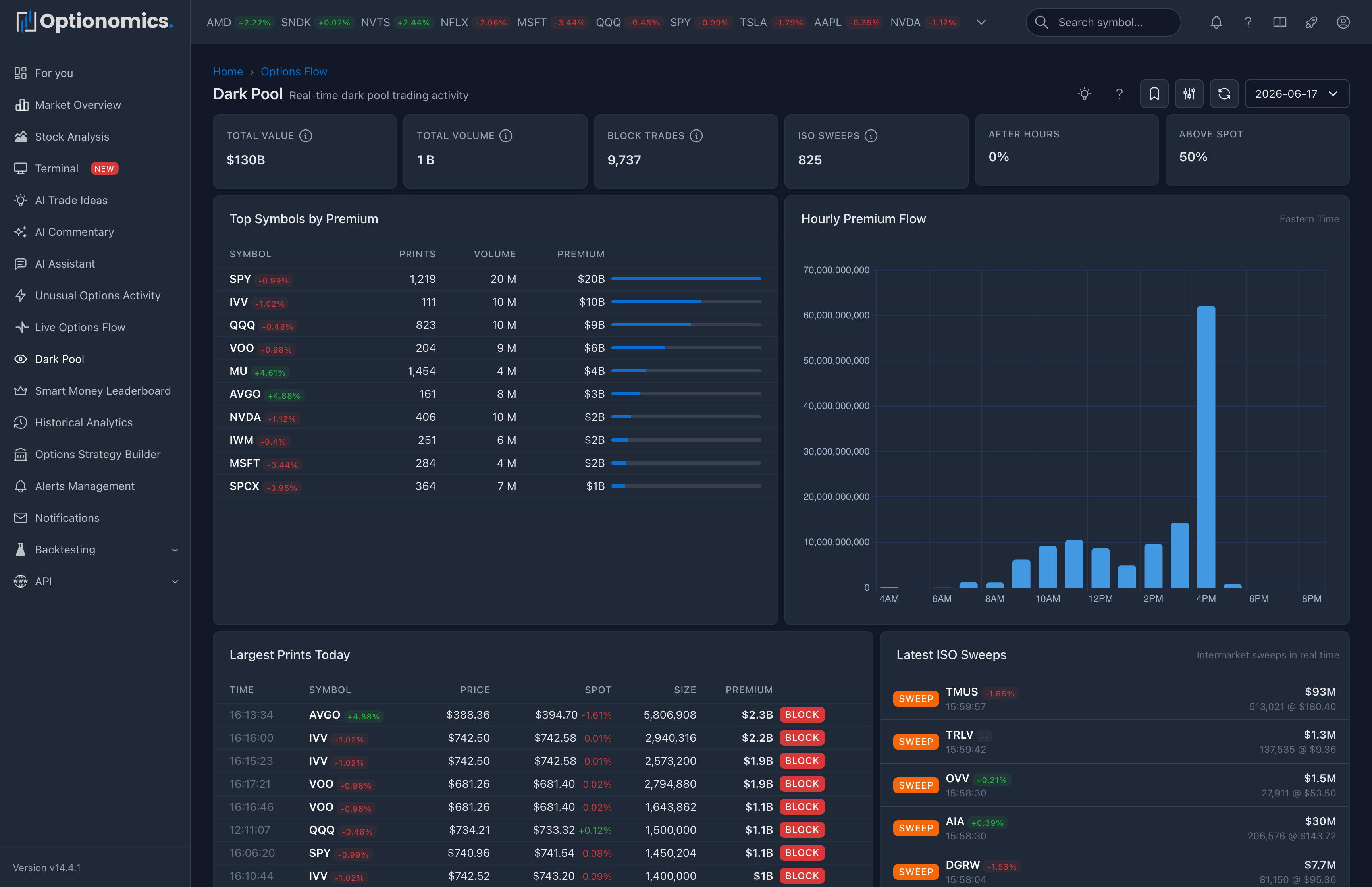
Why dark pool data belongs in an options platform
Options traders care about where stock liquidity has concentrated. A meaningful share of US equity volume prints in off-exchange venues, where large transactions can appear differently from the displayed exchange book. Optionomics surfaces that activity so you can compare equity-print context with gamma, chain concentrations, and options flow.
Dark pool trades are typically large equity blocks executed with minimal pre-trade visibility, often by institutions managing impact and information leakage. They are not a holy grail: a print can be accumulation, distribution, internal crossing, or one leg of a broader program. Treat them as additional context, especially when they cluster at a price zone or align with options-derived support or resistance.
Availability: Included with plans that carry live options flow—Gamma and higher.
Pairs well with: The chart’s DP overlay on the Stock Workspace, the Terminal’s Dark Pool S/R overlay, and gamma exposure for confluence checks.
Open it: Sidebar → Dark Pool (also at /darkpool). The tape switcher in the header moves between Flow, UOA, and Dark pool.
The summary rule and session ribbon
Across the top:
| Tile | What it shows |
|---|---|
| Off-exchange premium | Total dollar value of the prints in scope |
| Prints | How many prints |
| Shares | Aggregate share volume |
| Blocks | Prints at or above block size (10,000 shares) |
| ISO sweeps | Intermarket sweep prints |
| Avg size | Average print size |
The session ribbon draws each 10-minute slice with above-spot value up and below-spot value down, and gives a verdict—Bought up, Sold down, or Balanced. Drag across it to narrow the page to a time window.
Dark pool prints are consolidated rather than streamed row by row: on a live session, a pill appears—“N new prints — load”—and clicking it (or Refresh) pulls the table up to date.
Market-wide view (no symbol selected)
- Where size crossed — a ranking of the symbols with the most off-exchange value today: prints, shares, premium, and a Lean bar showing how much crossed above versus below spot. Click a symbol to focus the page on it.
- The prints — the tape itself, with three orderings: Biggest per name (the default—one standout print per symbol), Latest, and Sweeps.
Symbol-focused view
Focus a symbol (from the ranking, the search box, or another page) and the page rebuilds around that ticker:
- {Symbol} prints — that name’s tape, ordered by Largest, Latest, or Sweeps.
- Levels — support, resistance, and pivot prices derived from recent off-exchange prints, each with a strength bar and its distance from the current price. These are the same levels the chart’s DP overlay draws.
Use this view when a name shows up in your watchlist or in flow you’re already tracking, and you want the equity-side behavior alongside the options story.
The prints table
| Column | What it shows |
|---|---|
| Time | When the print reported |
| Symbol | The ticker (market-wide view) |
| Price | The print price |
| Spot | The underlying’s current price |
| vs spot | How far the print sat from spot, in % |
| Shares | Print size—bold at block size (10,000+ shares) |
| Premium | Dollar value |
| Marks | ISO (intermarket sweep), EXT (extended hours), ODD (odd lot) |
A Show more prints control at the foot of the table doubles the depth when you want to read further down the tape.
Filtering and Time Travel
The filter panel offers:
- Premium floor quick buttons: $500K+, $1M+, $5M+, $10M+
- Quick filters: Blocks, ISO sweeps, Odd lots, Extended hours, Above spot, Below spot
- Min size (shares), Min premium ($), and a price range
The date selector (Time Travel) replays a prior session, and Saved Views store a filter combination for one-click reuse.
How to read dark pool prints
| Pattern | What it may mean |
|---|---|
| Repeated prints clustered at the same price | Possible accumulation / distribution zone |
| Large prints near highs with weakening price | Possible distribution |
| Large prints near lows with stabilizing price | Possible accumulation |
| Heavy extended-hours value | Window to absorb size away from the lit tape |
| Sweeps clustering on a single name | Urgency from a single side |
| Print far from spot with very large value | Often a special situation (M&A, portfolio trade, basket leg) |
Building support / resistance from dark pool
A single print rarely defines a level. What strengthens a level:
| Factor | Weak level | Strong level |
|---|---|---|
| Trade size | Small | Very large value |
| Repetition | Single print | Multiple prints at the same price |
| Recency | Many days old | Within the last day or two |
| Deviation from spot | Far from spot | Close to spot |
The strongest dark pool levels usually co-locate with options-derived levels you already see in gamma exposure or in the chart’s DP overlay—use that confluence rather than dark pool alone.
Important context
- Dark pool prints are anonymous; the side (buy vs sell) is inferred, not certified.
- Large prints can be opening, closing, or one leg of a complex strategy—the tape rarely proves which.
- Extended-hours and odd-lot prints often look unusual; that does not always mean directional.
- Treat dark pool levels as additional evidence, not a primary trigger.
Remember: Dark pool data shows where off-exchange equity volume printed, not where price must go. Use it for confluence with options positioning, news, and your own plan.
Related:
- Options Flow
- Terminal — dark pool S/R overlays on the chart
- Stock Workspace — the DP toggle on the symbol chart
- Gamma Exposure
